

4.1
Free
NexusFile
Browse through your computer's contents for free with NexusFile
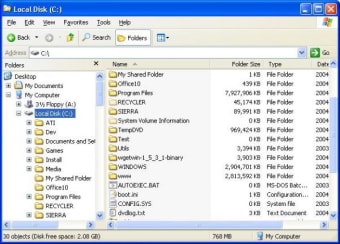
Folder Size for Windows adds a new column to the Details view in Windows Explorer. The new column shows not only the size of files, but also the size of folders. It keeps track of which folders you view, and scans them in the background so you can see complete size of all files within the folder. It's very useful for cleaning up your disk. Once you get used to having that information available, a directory listing simply looks incomplete without it!
Don't switch to another program to see folder sizes. It's always there when you're viewing your folders (even in Open and Save file dialog boxes, you can change the view), and it's a great visual cue to help you find the one you're looking for. Not just for disk cleanup, but for any time you need to choose a folder.
No scanning phase before you can start. As soon as you display the Folder Size column, you'll see sizes immediately. Large folders will continue to scan in the background while you browse your folders. Explorer will automatically update the folder size column in real-time. No more manual rescanning.
Background scans won't monopolize your disk. When Folder Size detects that other programs are doing a lot of reading to and writing from the hard disk being scanned, the background scanning will wait for the other programs to finish.
If you don't show the Folder Size column for a while, it won't forget what it's already scanned, but the background scanner doesn't stay active. It won't waste any CPU time maintaining the cache on your P2P sharing or gaming machine that's always changing files. Automatically displays in French, German, Italian, and Traditional and Simplified Chinese if Windows is one of those languages. More translations are welcome.

Optimize your disk space with SpaceMonger

Disk scanning tool for Windows

A free hard disk analyzer and clean-up tool
Free
Windows
Windows 2000
English
4.8K
274.43 KB
Have you tried Folder Size? Be the first to leave your opinion!
Add review
A free partition management program for Windows

A free tool for transferring Android files

Archive management streamlined

Reformat your phone's SD card for free

Precision control for immersive sound
Free
Browse through your computer's contents for free with NexusFile

Free
Streamline Folder Creation with New Folder Wizard

Free
A Free Tool that Makes Hard Drive Clearing Fun
Free
Disk scanning tool for Windows

Free
A free Software utilities program for Windows
Optimize your disk space with SpaceMonger
Disk scanning tool for Windows
A free hard disk analyzer and clean-up tool

A free disk space tracker
Analyze your disk and helps you to find and manage unwanted files.
Free FTP Client

Efficient File Management with PowerResizer

How will you use your free space?

Text to Speech & MP3 Converter Review

A more powerful alternative to Windows Explorer
All-In-One Protector: Document Security Tool
Free Folder Monitor: File Monitoring Software

A free app for Windows, by Wintools

Cigati CSV to vCard Converter

Use Cases For File Managers and vCards

Cigati Mail Migration Tool Overview

Cigati OLM to PST Converter Overview

Cigati PST Compress Tool Overview

Cigati OFT File Converter

Cigati Outlook Duplicate Remover